
capture > create > control
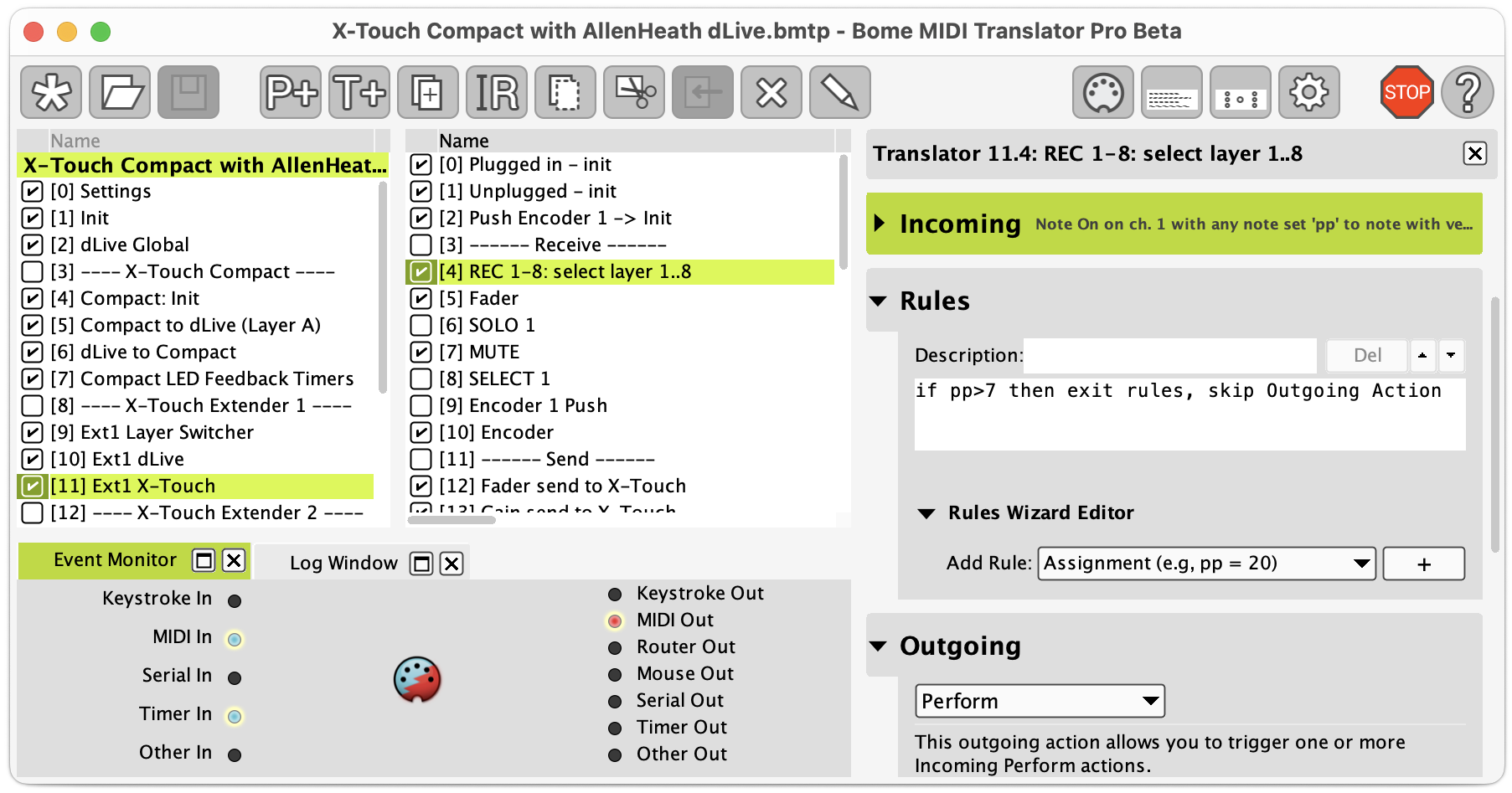
Bome MIDI Translator Pro is a versatile MIDI mapping, processing, and scripting tool. Create custom MIDI routings, rules, logic, layers. And with keystroke and mouse emulation, you can control any software on your computer using a MIDI controller.
“We use Bome MIDI Translator Pro for show control in some of our biggest shows to coordinate all systems involved in the show. It is working flawlessly.
Dan Burns — co-founder of Copilot Systems
Some examples where Bome MIDI Translator Pro is used:
- by musicians, both hobbyists and professionals
- by DJs and controllerists
- by lighting engineers
- in music studios and TV studios
- on big and small stages
- in theaters
- by photographers for raw development
- for MIDI control of games
- in research and development for rapid prototyping
Overview
Bome MIDI Translator Pro is a popular MIDI and keystroke mapping tool: use it for controlling arbitrary software by way of MIDI and keystrokes. Its rich feature set also allows it to be used for general computer automation.
With Bome MIDI Translator Pro you can control your computer from MIDI or other devices. For example: you can control your favorite software with a MIDI control surface, use MIDI turntables with arbitrary DJ software, map MIDI messages to other MIDI messages, and much more.
You can create your own mappings by defining the translations, or use one of the many pre-existing translation presets. We are constantly working on new presets, and the active community expands the available pool of presets, too.
Bome MIDI Translator Pro brochure »
“At Ableton, we’ve found Bome MIDI Translator Pro to be super helpful for prototyping new hardware products. It was essential to our first ‘hacked’ prototypes of Push 1, where we chopped up a few MIDI controllers, and combined them with a movable set of buttons using Legos and a Livid Brain. More recently, we have used MT Pro along with Adobe XD, so we can trigger mockups with our actual hardware prototypes. MT Pro is extremely flexible for designing exactly what you want — for commercial or personal use — without needing to be a software developer.
Jesse Terry, Head of Hardware at Ableton
Downloads
Trial Version
- The trial version only runs 20 minutes at a time (you can restart the program as often as you like)
- Project files saved with the trial version will not run in the
After purchase, you can load your project file into the fully registered version of Bome MIDI Translator Pro. Once saved there, it will work in the BomeBox. - The trial version cannot be unlocked: see next section for how to get the full, purchased version
Download Bome MIDI Translator Pro Trial 1.9.2
→ Download Archive → Version history
macOS Compatibility Info
MIDI Translator Pro is fully compatible with Apple Silicon and Intel processors.
Windows Compatibility Info
MIDI Translator Pro is fully compatible with Windows 64-bit on Intel or AMD processors.
The virtual MIDI ports are not compatible with Windows on ARM. 32-bit versions are available in the Download Archive.
Updates
Already own MIDI Translator Pro?
Please register or log in to retrieve your license key and to download the latest version.
→ My Account
Classic Edition
Please see the Classic page for more details.
→ MIDI Translator Classic
Purchase
- Price: € 79 (incl. VAT where it applies) (approx. US$ 92)
- Secure purchase via HTTPS
- Online order: you will receive license key and download link immediately by email.
Note: in very rare cases, your order may require manual verification by the payment service, or by your credit card company. It should not take more than 24 hours for completion.
- License covers Windows and macOS.
But please run one license only once at a given time.
€ 79 incl. VAT
Add to cart

→ Inquire for Educational Pricing
→ Upgrades
→ Request a Quote
Digital Download
This product is purchased as a digital download. After your purchase, you will receive the download link and your personal license key via email.
Software Protection
Please note that this software uses technical means to prevent modification of the software itself. If the binary executables are modified, the program will stop working. This can be fixed by reinstalling the software from the original installer.
Newsletter
Screenshots


Video Tutorials
You can watch the clips on YouTube.
Features
MIDI Translator Pro works by specifying mappings for different input and output types. Below is a list of different trigger types (Incoming) and action types (Outgoing). You can combine them as you wish (e.g. do keystroke-to-MIDI conversion, or MIDI-to-mouse mapping).
Incoming Actions
- MIDI messages
- MIDI Port plugged in/unplugged
- keystrokes
- timer
- application focus
- opening a project file
- enable/disable the current preset
- bytes or text on a serial port
- perform (callback from outgoing perform)
Processing ("Rules")
A sequence of rules can be defined to be processed if the incoming action matches:
- assignments of variables, e.g. pp = 20
- simple expressions, e.g. pp = og + 128
- labels and goto, e.g. goto "2nd Options"
- conditional execution, e.g. IF pp < 20 THEN do not execute Outgoing Action
Outgoing Actions
- MIDI messages
- MIDI port
- add/remove/disable/enable MIDI routes
- keystrokes
- mouse movements
- application focus
- create/start/stop timer
- change active preset
- enable/disable the current preset
- execute program
- open a project file
- send bytes or text to serial ports
- execute AppleScript (macOS only)
- trigger the incoming perform action
Support
Documentation
The Documentation (Reference Manual) provides descriptions of all features and functions offered by Bome MIDI Translator Pro. It is included with the installed program, but you can also download it here.
Bome MIDI Translator Pro user’s manual
The user Eric Deleplanque has created an inofficial French translation of the older version 1.8.4. Thank you very much!
Bome MIDI Translator Pro 1.8.4 Manuel Utilisateur Francais (inofficielle)
Bome Forum
The Bome team is active in the forum and makes sure that everybody’s request will be satisfied as soon as possible. This is the recommended way to get help for specific problems.
Moreover, users can interchange know-how, tricks and their experiences.
→ Bome Forum
Purchase Support
For any problems with purchasing MIDI Translator Pro, please contact us directly.
→ Purchase Support
Email Support
Our main technical support is handled in the forum. However, if you own a license and require personal support, please use our contact form:
→ MIDI Translator Pro Licensed Support
Licensing
Do you need Bome MIDI power in your own products? We offer some options for licensing our products for redistribution.
You can license MIDI Translator Pro and the runtime MT Player for redistribution. This is especially useful for building or expanding your business by selling Presets with your customized MT Player.
→ MT Player OEM Licensing
The Bome virtual MIDI port driver is a versatile and robust way to add virtual MIDI ports to Windows and macOS. See the BMIDI page for more information and how to license it.
→ BMIDI Virtual MIDI Driver SDK